
Blog
Guidelines to Design an Automation Testing Framework


Blog
Guidelines to Design an Automation Testing Framework





Introduction to Frameworks
All engineering teams might agree on the importance of an efficient framework whether it is developing an application or automated testing. For automation testing, there are a bunch of frameworks available online like Robot and Nose, even Python provides Pytest with all basic features a framework should possess.
While these frameworks provide a wide range of features, they may always not be customizable to your needs. Apart from the feature, there will always be an external dependency for support and maintenance with these frameworks. What will you do in that scenario? Compromise? That is not the solution for long-term, at least with the framework.
What if you can design a framework which works flawlessly with your application? Assuming you are a bit flexible about time (and why not if it will save you a lot of time, trouble and complexity in future) and you have required expertise in a programming language. In this blog, we will provide you with basics and flow for creating your own framework as per your needs. And it is going to be exciting!
You will get to know the flow for creating an engineering framework, features you can add to your framework, the guidelines and best practices.
What Features Should be Included in the framework?
A framework is a set of guidelines which you should follow for like increase code re-usage, higher portability, reduced script maintenance and consistency in your code. The following are the features engineering teams should expect in a framework?
- Handle scripts to be executed and input parameters separately
- Library to contain all reusable components
- Reporting of results
- Integration with third-party tools
- Automated trigger with no human intervention i.e. self-executing and self-cleaning
This is just a basic list to consider while designing a framework. You can either add or remove anything as per your requirements, environment and application under consideration. Mind that these are just guidelines and not rules. Using the below framework design we have automated close to 500 test cases for an enterprise-level web application.
Your framework will communicate between systems, interfaces, and applications under test. Following diagram will illustrate the structure of a test automation framework and its specifics:
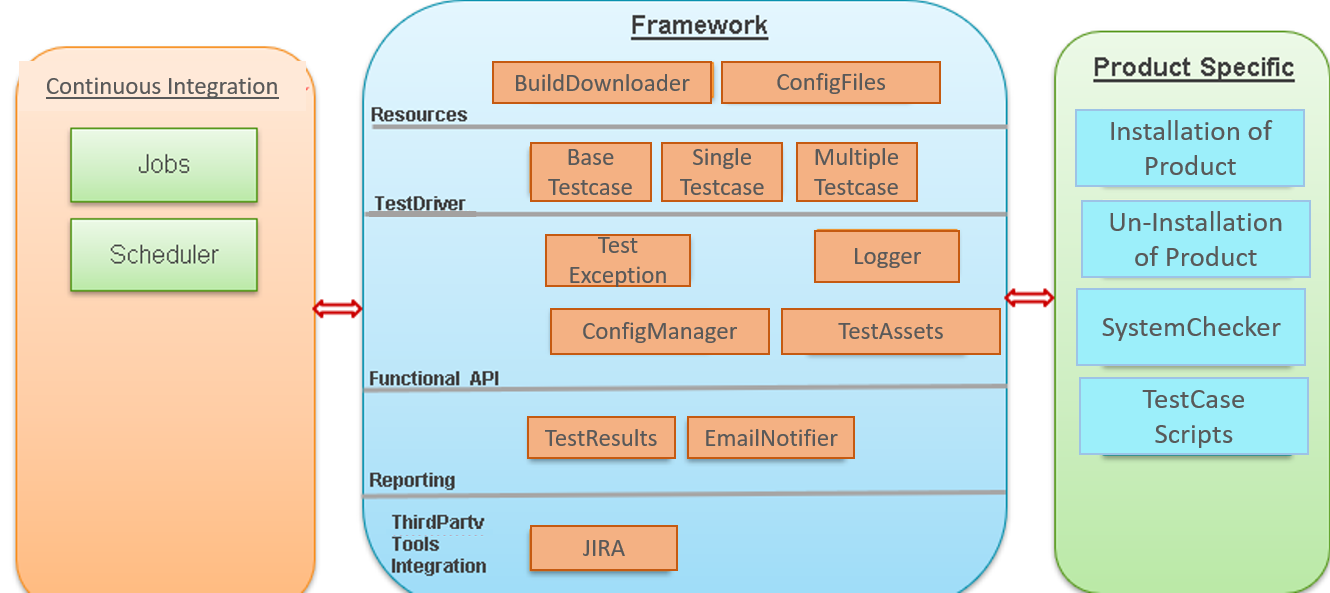
Block Diagram of Infrastructure Development
In the above block diagram, we have all the modules which were required for the Infrastructure development. So, all the modules might not be applicable to you. The beauty of creating a framework is that it is configurable and flexible. You do not have to stick to any specific design.
Continuous Integration
This part will communicate with the framework for running any specific jobs you require for testing or running test cases. We can configure a scheduler for starting testing on a fixed schedule.
Framework
This is the area where everything will happen. We have divided our framework into five sections as per our needs, you might not require all of them:
- Resources: This section will deal with the things you need to start your testing, like build to test and the user inputs from a config file it can be a JSON or INI or any other supported format. We use testconfig.ini and framework.ini which contain user inputs related to test scripts and framework respectively.
- Test Driver: This section will deal with the test case format and how you want to run test cases, one at a time or running multiple test cases or a group of test cases identified by a keyword. You can also add a remote communication point for remote execution of test cases.
- Functional API: This section will have the APIs related to application functionality.
- Reporting: As after testing we need to store and report the results, here we can configure those. We can choose to create an HTML report or email the report.
- Third-Party Tools Integration: We can create modules for our framework to interact with third-party applications like JIRA for updating the run results of a test case. Or for any other purposes specific to your application and requirements.
Product-Specific Operations
Here we will put all the product-specific operations which we have to perform every time we start testing an application like installation, prerequisites check, test cases to be executed.
Below is the flowchart which we follow for our automation testing. You can use this adaptation or use a modified version of it.

Test Infrastructure Adaptation
Conclusion
In today’s environment, the test automation framework has become an integral component of a software testing life cycle. However, if we use any of the existing frameworks, there is a possibility that it might not fulfill all your requirements for your automation testing. By following the above automation test framework design, users can automate test cases for web applications efficiently.
Want to accelerate software delivery with Xoriant engineering frameworks?





 View Previous Blog